Please navigate to the bottom of the page for Table of Contents
Showing posts with label EF. Show all posts

Friday, March 22, 2013

Entity Framework Interview Question - Explain ENUM usage in EF5

Entity Framework 5 introduced support for Enum’s amongst other new features. This was a long awaited feature by the community. In this post, we will explore how enums work with entity framework, how can you code them, how to use them, how they are represented in the database, etc.

Question: Write code to demonstrate ENUM usage in Entity Framework.

For this exercise, please make sure that your project references at least version 5 of Entity Framework. You can use NuGet to add that to your project.

Model

In Entity Framework, an enumeration can have the following underlying types: Byte, Int16, Int32, Int64 , or SByte. I chose 3 different enum types to highlight the differences in database representation for different enum types.
    public enum DefaultEnum
    {
        Red = 1,
        Blue = 2,
        Green = 3
    }

    public enum ByteEnum : byte
    {
        RedByte,
        BlueByte,
        GreenByte
    }

    public enum ShortEnum : short
    {
        RedShort,
        BlueShort,
        GreenShort
    }

Now, let’s define our Account class that uses these enums.
    public class EnumDemoAccount
    {
        [Key]
        [DatabaseGeneratedAttribute(DatabaseGeneratedOption.Identity)]
        public int Id { get; set; }
        public string Name { get; set; }

        // our enum fields
        public DefaultEnum DefaultEnum { get; set; }
        public ByteEnum ByteEnum { get; set; }
        public ShortEnum ShortEnum { get; set; }
    }

As you can note, I am generating the Identity column as auto-incrementing (bonus).

Context


Our Context definition is pretty standard for this example. All I am telling the system is to create a database with the name I have given (instead of it choosing one based on namespace + class.
    public class AccountContext : DbContext
    {
        public DbSet<EnumDemoAccount> EnumDemoAccounts { get; set; }

        public AccountContext() : base("EFDemoDb")
        {}
    }

I also like to like to create a context initializer for test projects so that I always have a clean database for each run:
    public class DatabaseContextInitializer : 
        DropCreateDatabaseAlways<AccountContext>
    {
        protected override void Seed(AccountContext dbContext)
        {
            base.Seed(dbContext);
        }
    }

Test code


The test code is simple as well. We first set our initialization strategy, create a context, add a few records and see how things look.
        static void Main(string[] args)
        {
            // initialization 
            Database.SetInitializer<AccountContext>
                (new DatabaseContextInitializer());

            // create a new context
            AccountContext ac = new AccountContext();

            // add a couple of test entries
            ac.EnumDemoAccounts.Add(
                new EnumDemoAccount()
                {
                    Name = "First",
                    DefaultEnum = DefaultEnum.Blue,
                    ByteEnum = ByteEnum.GreenByte,
                    ShortEnum = ShortEnum.RedShort
                });

            ac.EnumDemoAccounts.Add(
                new EnumDemoAccount()
                {
                    Name = "Second",
                    DefaultEnum = DefaultEnum.Green,
                    ByteEnum = ByteEnum.RedByte,
                    ShortEnum = ShortEnum.BlueShort
                });

            // save to db
            ac.SaveChanges();

            // display
            foreach (var account in ac.EnumDemoAccounts)
            {
                Console.WriteLine(
                    "Name: {0}\n\tDefaultEnum:{1}\n\tByteEnum:{2} \n\tShortEnum: {3}",
                    account.Name,
                    account.DefaultEnum,
                    account.ByteEnum,
                    account.ShortEnum);
            }

            Console.ReadKey();
        }

Output


Now let’s review the output we got:

EnumDemo-output

As you can see, the enum values survived the round trip to the database. Wonderful! And they are all strongly typed so we can use them in our regular programming.

Database


Understanding what happened on the database side is equally important. Remember, we created 3 different enum types in our model – int, short and byte. Does the data type of the enum make any difference in the storage scheme? You bet! Let’s see how Entity Framework internally represents these types to the database:

EnumDemo-db-table

Note that the default enum data type (int) remained as int. Byte was translated as tinyint and Short as smallint. So, if you are using enums, think hard about your use cases and choose the appropriate datatype for your enums.

And finally, to round things up, let’s see what data values are stored in our database:

EnumDemo-db-query-output

No surprises here. Auto generated identity column, proper values for our enums. Things look good. Hoping that this post has given you a good starting point about enums in Entity Framework 5.

Thursday, March 21, 2013

Entity Framework Interview Question – what are the different ways to configure database name?

Entity Framework allows you to create a model (either using code-first approach or modelling tools) which can target an existing database or create a new one. Generally, you would extend DbContext and the derived class would call one of the base constructors of base class to figure out how to connect to the database. The .Net framework now increasingly favors and supports convention over configuration and this is quite evident in how DbContext discovers the database. We will cover a few of the approaches in how a code-first model discovers the database.

Connection by Convention
Let's examine the following code: 

namespace MvcApplication1.Models
{

    public class UsersContext : DbContext
    {
        public UsersContext()
        {
        }

        public DbSet<UserProfile> UserProfiles { get; set; }
    }

}

In the example shown above, if you have not done any other configuration in your application, then calling the parameterless constructor on DbContext will cause DbContext to run in Code First mode with a database connection created by convention. In this example DbContext uses the namespace qualified name of your derived context class — MvcApplication1.Models.UsersContext — as the database name and creates a connection string for this database using either SQL Express or LocalDb as shown below:


Connection by Convention with database name specified
If you do not like the name given by default, you can also specify what database name to use as an argument to the base class constructor as shown in the code below:

    public class UsersContext : DbContext
    {
        public UsersContext() : base("SuperCoolAppDatabase")
        {
        }

        public DbSet<UserProfile> UserProfiles { get; set; }
    }

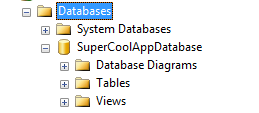
This results in a database being created (or used if existing) with a more cleaner name as shown:


Connection by Convention withconnection string define in app/web config
If you do not like to code your database name in code, you can more easily specify it in the config file for your application. This is also very useful if you would be using something other than SQL Express or LocalDb as your database; e.g. SQL Server, SQL CE, etc. 

Follow the following convention to add a connect string entry in your web.config or app.config:


  <connectionStrings>
    <add name="MyAppConnStr" 
         providerName="System.Data.SqlServerCe.4.0"
         connectionString="Data Source=Blogging.sdf"/>
  </connectionStrings>

Now that you have defined your named connection string, there are two ways in which this can be discovered by the context:
1. If the name (in this case MyAppConnStr) matches the name of the context (with or without the namespace) it will be used. In our example above, this is not true (unless we named the connect string to be UsersContext).
2. The connection string name can be passed as an argument to the base constructor of your context as shown in the code below:

    public class UsersContext : DbContext
    {
        public UsersContext()
            : base("MyAppConnStr")
        {
        }

        public DbSet<UserProfile> UserProfiles { get; set; }
    }

 Since the system is flexible enough to use the name passed into DbContext constructor to determine whether it is a connection string name or database name, a good recommendation is to explicitly pass it as name="your conn string name". That makes the definition and intent clear to all and leaves no room for ambiguity. Also, an exception will be thrown if a connection string with the given name is not found.

    public class UsersContext : DbContext
    {
        public UsersContext()
            : base("name=MyAppConnStr")
        {
        }

        public DbSet<UserProfile> UserProfiles { get; set; }
    }

To recap, in this post, we explored different means to allow Entity Framework to discover which database to use using the code-first model.

Thursday, June 7, 2012

Entity Framework transaction scope examples

Transactions as a core building block of entity framework. The DbContext object which we heavily use for interacting with the database uses transactions internally without you having to do anything extra. In case you need to manually provide transaction support, here is how you can do it.
In this post, I cover three cases in which transaction scope is being used to show rollback when an error occurs during an update of multiple entities:
  1. when you have multiple save calls to the context;
  2. when you have  single save with multiple object; and
  3. transactions across multiple contexts.
Let’s first review our simple model and context object. To re-create this project, use Visual Studio 2010 console project with Entity Framework 5.0 RC bits from nuget.
Our model is a simplified version of a “Product” object and it’s definition look like this:
using System;
using System.ComponentModel.DataAnnotations;
 
namespace EFTransactionsDemo.Model
{
    public class Product
    {
        public int Id { get; set; }
        [Required]
        public string Name { get; set; }
        [Required]
        public DateTime DateAdded { get; set; }
    }
}


Our context definition looks like:

using System.Data.Entity;
using System.Data.Entity.ModelConfiguration.Conventions;
 
namespace EFTransactionsDemo.Model
{
    public class EFTDbContext : DbContext
    {
        public DbSet<Product> Products { get; set; }
         
        public EFTDbContext() : 
            base("EFTransactionsDemo")
        {
            // disable proxy creation 
            this.Configuration.ProxyCreationEnabled = false;
        }
         
        protected override void OnModelCreating(DbModelBuilder modelBuilder)
        {
            // Tell Code First to ignore PluralizingTableName convention
            // If you keep this convention then the generated tables will have pluralized names.
            modelBuilder.Conventions.Remove<PluralizingTableNameConvention>();
        }
    }
}


The main method (this is demo code; in production environments, please make sure to use proper programming paradigms, do error handling, parameter checks, etc.), calls three functions that demonstrate the use of transaction scope for the three scenarios I listed above.

using System;
using System.Linq;
using System.Transactions;
using EFTransactionsDemo.Model;

namespace EFTransactionsDemo
{
    class Program
    {
        static void Main(string[] args)
        {
            // setup
            CreateDatabase();

            // transaction demo - 1
            // wrap multiple save calls within one transaction
            // and roll back on a bad one
            TestMultipleSaveCalls();

            // transaction demo - 2
            // wrap multiple adds and one save within one transaction
            // and roll back on a bad one
            TestMultipleAddWithOneSaveCall();

            // transaction demo - 3
            // multiple contexts in same transaction
            TestMultipleContexts();
        }

        private static void TestMultipleSaveCalls()
        {
            // good product
            Product goodProduct = new Product()
            {
                Name = "My awesome book",
                DateAdded = DateTime.UtcNow
            };

            // invalid product
            Product invalidProd = new Product()
            {
                Name = "My awesome book part 2"
                // note - no date added specified
            };

            // define our transaction scope
            var scope = new TransactionScope(
                // a new transaction will always be created
                TransactionScopeOption.RequiresNew,
                // we will allow volatile data to be read during transaction
                new TransactionOptions()
                {
                    IsolationLevel = IsolationLevel.ReadUncommitted
                }
            );

            try
            {
                // use the scope we just defined
                using (scope)
                {
                    // create a new db context
                    using (var ctx = new EFTDbContext())
                    {
                        // add the product
                        ctx.Products.Add(goodProduct);
                        // save
                        ctx.SaveChanges();

                        // add the invalid product
                        ctx.Products.Add(invalidProd);
                        // save
                        ctx.SaveChanges();
                    }

                    // everything good; complete
                    scope.Complete();
                }
            }
            catch { }

            // verify that we actually rolled back
            using (var ctx = new EFTDbContext())
            {
                Console.WriteLine(ctx.Products.Count());
            }
        }

        private static void TestMultipleAddWithOneSaveCall()
        {
            // good product
            Product goodProduct = new Product()
            {
                Name = "My awesome book",
                DateAdded = DateTime.UtcNow
            };

            // invalid product
            Product invalidProd = new Product()
            {
                Name = "My awesome book part 2"
                // note - no date added specified
            };

            // define our transaction scope
            var scope = new TransactionScope(
                // a new transaction will always be created
                TransactionScopeOption.RequiresNew,
                // we will allow volatile data to be read during transaction
                new TransactionOptions()
                {
                    IsolationLevel = IsolationLevel.ReadUncommitted
                }
            );

            try
            {
                // use the scope we just defined
                using (scope)
                {
                    // create a new db context
                    using (var ctx = new EFTDbContext())
                    {
                        // add the product
                        ctx.Products.Add(goodProduct);

                        // add the invalid product
                        ctx.Products.Add(invalidProd);
                        // save
                        ctx.SaveChanges();
                    }

                    // everything good; complete
                    scope.Complete();
                }
            }
            catch { }

            // verify that we actually rolled back
            using (var ctx = new EFTDbContext())
            {
                Console.WriteLine(ctx.Products.Count());
            }
        }

        private static void TestMultipleContexts()
        {
            // good product
            Product goodProduct = new Product()
            {
                Name = "My awesome book",
                DateAdded = DateTime.UtcNow
            };

            // invalid product
            Product invalidProd = new Product()
            {
                Name = "My awesome book part 2"
                // note - no date added specified
            };

            // define our transaction scope
            var scope = new TransactionScope(
                // a new transaction will always be created
                TransactionScopeOption.RequiresNew,
                // we will allow volatile data to be read during transaction
                new TransactionOptions()
                {
                    IsolationLevel = IsolationLevel.ReadUncommitted
                }
            );

            try
            {
                // use the scope we just defined
                using (scope)
                {
                    // create a new db context
                    var firstCtx = new EFTDbContext();
                    // create a second context
                    var secondCtx = new EFTDbContext();

                    // add the product to first context
                    firstCtx.Products.Add(goodProduct);
                    // save
                    firstCtx.SaveChanges();

                    // add the invalid product to second context
                    secondCtx.Products.Add(invalidProd);
                    // save
                    secondCtx.SaveChanges();

                    // everything good; complete
                    scope.Complete();
                }
            }
            catch { }

            // verify that we actually rolled back
            using (var ctx = new EFTDbContext())
            {
                Console.WriteLine(ctx.Products.Count());
            }
        }

        private static void CreateDatabase()
        {
            using (var ctx = new EFTDbContext())
            {
                ctx.Database.CreateIfNotExists();
            }
        }
    }
}

As always, please do leave your thoughts and comments. It is the user feedback that drives the product and blog better.

Tuesday, July 19, 2011

Entity Framework and lazy loading interview questions

Lazy loading is the process whereby an entity or collection of entities is automatically loaded from the database the first time that a property referring to the entity/entities is accessed.

Let’s reuse our model defined for eager loading.


using System;
using System.Collections.Generic;
using System.ComponentModel.DataAnnotations;

namespace EFDemo.Model
{
// Code first relies on a programming pattern
// referred to as convention over configuration.
// What this means is that if you want to use code first,
// your classes need to follow the certain conventions
// while defining schema.
// This allows EF to infer the schema that it needs to
// create to get the job done.
public class Project
{
// Code First has to be told that
// this as the primary key column
[Key]
public int UniqueProjectIdentifier { get; set; }
// this becomes a non-nullable column
[Required]
public string Name { get; set; }
// references the complex type as part of the
// project object in the database
public ProjectDetails Details { get; set; }
// list of tasks for a project
public virtual List<Task> Tasks { get; set; }

[NotMapped]
public string ProjectCode
{
get { return UniqueProjectIdentifier + Name;}
}
}

[ComplexType]
public class ProjectDetails
{
public DateTime? DateCreated { get; set; }
[MaxLength(500, ErrorMessage = "Maximum of 500 characters please")]
[MinLength(10, ErrorMessage = "Minimum of 10 characters required")]
public string Description { get; set; }
}

[Table("ProjectItems")]
public class Task
{
// Code First infers this as the primary key column
public int TaskId { get; set; }
public string Name { get; set; }

[Column("CreationDate")]
public DateTime StartDate { get; set; }
public DateTime EndDate { get; set; }

// this is inferred as Foreign key to project table
public int ProjectId { get; set; }

// explicitly define the FK
[ForeignKey("ProjectId")]
public virtual Project Project { get; set; }

public Employee CreatedBy { get; set; }
public Employee UpdatedBy { get; set; }
}

public class Employee
{
public int Id { get; set; }
public string name { get; set; }

[InverseProperty("CreatedBy")]
public List<Task> TasksCreated { get; set; }
[InverseProperty("UpdatedBy")]
public List<Task> TasksUpdated { get; set; }
}

}


Question 1: How can you disable lazy loading of related entities accessed via navigation properties?

Lazy loading of the tasks for a project can be turned off by removing the virtual keyword for that navigation property.


public class Project
{
// Code First has to be told that
// this as the primary key column
[Key]
public int UniqueProjectIdentifier { get; set; }
// this becomes a non-nullable column
[Required]
public string Name { get; set; }
// references the complex type as part of the
// project object in the database
public ProjectDetails Details { get; set; }
// list of tasks for a project
public List<Task> Tasks { get; set; }

[NotMapped]
public string ProjectCode
{
get { return UniqueProjectIdentifier + Name;}
}
}


In the Project definition above, lazy loading for Tasks has been disabled by removing the virtual keyword for Tasks. Of course, loading of Tasks can still be accomplished using the eager loading constructs or by using an explicit Load().

Question 2: How can you disable lazy loading for all entities?

Lazy loading can be turned off for all entities in the context by setting a flag on the Configuration property. This can be defined in the context:


public class EFDemoContext : DbContext
{
public EFDemoContext()
{
// disable lazy loading for all entities
this.Configuration.LazyLoadingEnabled = false;
}

public DbSet<Project> Projects { get; set; }
public DbSet<Task> Tasks { get; set; }
public DbSet<Employee> Employees { get; set; }
}

Entity Framework and eager loading of related entities interview questions

Question: Using the DbContext API’s in Entity Framework 4.1, explain the concept of eager loading related entities.

Eager loading can be defined as a directive to include related entities when loading an entity in a query. Eager loading is achieved by use of the Include() method.

Let us assume this simple code first model of Project and Tasks which we discussed in our earlier post of data annotations in Entity Framework.


using System;
using System.Collections.Generic;
using System.ComponentModel.DataAnnotations;

namespace EFDemo.Model
{
// Code first relies on a programming pattern
// referred to as convention over configuration.
// What this means is that if you want to use code first,
// your classes need to follow the certain conventions
// while defining schema.
// This allows EF to infer the schema that it needs to
// create to get the job done.
public class Project
{
// Code First has to be told that
// this as the primary key column
[Key]
public int UniqueProjectIdentifier { get; set; }
// this becomes a non-nullable column
[Required]
public string Name { get; set; }
// references the complex type as part of the
// project object in the database
public ProjectDetails Details { get; set; }
// list of tasks for a project
public virtual List<Task> Tasks { get; set; }

[NotMapped]
public string ProjectCode
{
get { return UniqueProjectIdentifier + Name;}
}
}

[ComplexType]
public class ProjectDetails
{
public DateTime? DateCreated { get; set; }
[MaxLength(500, ErrorMessage = "Maximum of 500 characters please")]
[MinLength(10, ErrorMessage = "Minimum of 10 characters required")]
public string Description { get; set; }
}

[Table("ProjectItems")]
public class Task
{
// Code First infers this as the primary key column
public int TaskId { get; set; }
public string Name { get; set; }

[Column("CreationDate")]
public DateTime StartDate { get; set; }
public DateTime EndDate { get; set; }

// this is inferred as Foreign key to project table
public int ProjectId { get; set; }

// explicitly define the FK
[ForeignKey("ProjectId")]
public virtual Project Project { get; set; }

public Employee CreatedBy { get; set; }
public Employee UpdatedBy { get; set; }
}

public class Employee
{
public int Id { get; set; }
public string name { get; set; }

[InverseProperty("CreatedBy")]
public List<Task> TasksCreated { get; set; }
[InverseProperty("UpdatedBy")]
public List<Task> TasksUpdated { get; set; }
}

}


To eagerly load the tasks for all projects or a specific projects, we can use one of the following ways:


using (var context = new EFDemoContext())
{
// Load all projects and the associated tasks
var allprojects = context.Projects
.Include(p => p.Tasks)
.ToList();

// Load a specific project and all its tasks
var efProj = context.Projects
.Where(p => p.Name == "EF Demo")
.Include(p => p.Tasks)
.FirstOrDefault();

// Load all projects and related tasks using a string
// to specify the relationship
var allprojectsUsingString = context.Projects
.Include("Tasks")
.ToList();

// Load a specific project and its tasks using a string
// to specify the relationship
var efProj2 = context.Projects
.Where(p => p.Name == "EF Demo")
.Include("Tasks")
.FirstOrDefault();
}


Question 2: How can we eagerly load multiple levels of related entities?

Using the model above, we can load the projects, tasks and employees in multiple ways:

// load all employees, tasks and projects
var allData = context.Employees
.Include(e => e.TasksCreated.Select(t => t.Project))
.ToList();

// load all employees, tasks and projects
var allData2 = context.Projects
.Include(p => p.Tasks.Select(t=>t.CreatedBy))
.ToList();


In the next post we will review the lazy loading concepts of Entity Framework.

Entity Framework interview questions

Entity Framework is Microsoft’s latest and recommended way for data access for new applications. EF 4.1 enhances the offering by adding support for Code First model and DbContext API’s. The post assumes basic knowledge of Entity Framework. If you are not familiar with EF, I would recommend that you review the basics @ http://msdn.microsoft.com/en-us/data/ef. If you are interested in Code First approach, a very good tutorial that I would recommend is http://blogs.msdn.com/b/adonet/archive/2011/03/15/ef-4-1-code-first-walkthrough.aspx.

In this post we will explore 10 interview questions on Code First Data Annotations.

Question 1: Design a code first data model which has a Project class that can contain a bunch of tasks.

For our discussion, we will assume that we are using the Code First model and that our model is made up of the following 2 classes:


using System;
using System.Collections.Generic;

namespace EFDemo.Model
{
// Code first relies on a programming pattern
// referred to as convention over configuration.
// What this means is that if you want to use code first,
// your classes need to follow the certain conventions
// while defining the schema.
// This allows EF to infer the schema that it needs to
// create to get the job done.
public class Project
{
// Code First infers this as the primary key column
public int Id { get; set; }
// this becomes a nullable column
public string Name { get; set; }
public string Description { get; set; }

// list of tasks for a project
public virtual List<Task> Tasks { get; set; }
}

public class Task
{
// Code First infers this as the primary key column
public int TaskId { get; set; }
public string Name { get; set; }

public DateTime StartDate { get; set; }
public DateTime EndDate { get; set; }

// this is inferred as Foreign key to project table
public int ProjectId { get; set; }
}

}

This model produces the following database. I have highlighted the relevant items that I would like you to understand before we proceed further.

image


Now let’s review a few simple entity framework interview questions.

Question 2: Using Code First model, how can I mark a field/property as the primary key if it does not follow the code first convention?

In our case above, EF looks for the word “ID” with a combination with the entity name (e.g. Project) to determine both the EntityKey and the primary key. If we rename the “Id” to say “UniqueProjectIdentifier”, we will need to decorate that property with the KeyAttribute ([Key]) to make it all work.

In the code below, we redefined our primary key but did not provide any data annotations.


public class Project
{
// Code First has to be told that
// this as the primary key column
public int UniqueProjectIdentifier { get; set; }
// this becomes a nullable column
public string Name { get; set; }
public string Description { get; set; }

// list of tasks for a project
public virtual List<Task> Tasks { get; set; }
}

This produces the following error:

image


The fix is simple. Just add the [Key] attribute as shown below.


public class Project
{
// Code First has to be told that
// this as the primary key column
[Key]
public int UniqueProjectIdentifier { get; set; }
// this becomes a nullable column
public string Name { get; set; }
public string Description { get; set; }

// list of tasks for a project
public virtual List<Task> Tasks { get; set; }
}


Question 3: When you have a annotate a property as Primary key in a table, how do you enable foreign key relationship from another table?

Although this “fix” solved the primary key issue for the Project class, it failed to infer our Foreign Key relationship in the Task class. It actually created a new FK and ignored our ProjectId key.

image

Now that we have a custom primary key, we also have to annotate a foreign key for the Task table. The solution is to define a navigation property for Task and annotate it to mark the ProjectId property as the FK.


public class Task
{
// Code First infers this as the primary key column
public int TaskId { get; set; }
public string Name { get; set; }

public DateTime StartDate { get; set; }
public DateTime EndDate { get; set; }

// this is inferred as Foreign key to project table
public int ProjectId { get; set; }

// explicitly define the FK
[ForeignKey("ProjectId")]
public virtual Project Project { get; set; }
}


Question 4: How do you mark a property as required? For example, For a Project, the Name is a required field.

You use the [Required] attribute to mark a property as required.


public class Project
{
// Code First has to be told that
// this as the primary key column
[Key]
public int UniqueProjectIdentifier { get; set; }
// this becomes a non-nullable column
[Required]
public string Name { get; set; }
public string Description { get; set; }

// list of tasks for a project
public virtual List<Task> Tasks { get; set; }
}


Question 5: How do you enforce a field to have a minimum and maximum number of characters? For example, the Description on a Project should be a minimu of 10 and a maximum of 500?

EF provides us with convenient property annotations of MinLength and maxLength.


public class Project
{
// Code First has to be told that
// this as the primary key column
[Key]
public int UniqueProjectIdentifier { get; set; }
// this becomes a non-nullable column
[Required]
public string Name { get; set; }
[MaxLength(500, ErrorMessage="Maximum of 500 characters please")]
[MinLength(10, ErrorMessage="Minimum of 10 characters required")]
public string Description { get; set; }

// list of tasks for a project
public virtual List<Task> Tasks { get; set; }
}


After the 2 changes described above, our database looks like:

image

Question 6: Define a property in project class named ProjectCode that is not mapped to the database. ProjectCode is internally calculated as a combination of project ID and Title.

Normally, in code first convention, all properties are mapped to the database. If we want to exclude a specific property (generally a computed property), we can annotate it with [NotMapped] attribute.


public class Project
{
// Code First has to be told that
// this as the primary key column
[Key]
public int UniqueProjectIdentifier { get; set; }
// this becomes a non-nullable column
[Required]
public string Name { get; set; }
[MaxLength(500, ErrorMessage="Maximum of 500 characters please")]
[MinLength(10, ErrorMessage="Minimum of 10 characters required")]
public string Description { get; set; }

// list of tasks for a project
public virtual List<Task> Tasks { get; set; }

[NotMapped]
public string ProjectCode
{
get
{
return UniqueProjectIdentifier + Name;
}
}
}

Question 7: If your domain entities are defined using a set of classes, how can you combine them in EF to form one complete entity?

Let us assume that our Project class has another class called ProjectDetails which has date created and the description field. Using normal EF code first data model, EF will create 3 tables. But we want to tell EF to create only 2 tables (Project and task). To achieve this we will use the [ComplexType] annotation on the Project Details as shown below:

public class Project
{
// Code First has to be told that
// this as the primary key column
[Key]
public int UniqueProjectIdentifier { get; set; }
// this becomes a non-nullable column
[Required]
public string Name { get; set; }
// references the complex type as part of the
// project object in the database
public ProjectDetails Details { get; set; }
// list of tasks for a project
public virtual List<Task> Tasks { get; set; }

[NotMapped]
public string ProjectCode
{
get { return UniqueProjectIdentifier + Name;}
}
}

[ComplexType]
public class ProjectDetails
{
public DateTime? DateCreated { get; set; }
[MaxLength(500, ErrorMessage = "Maximum of 500 characters please")]
[MinLength(10, ErrorMessage = "Minimum of 10 characters required")]
public string Description { get; set; }
}


This results in the following database schema:

clip_image001[4]

The calling code also needs to be changed:


class Program
{
static void Main(string[] args)
{

Database.SetInitializer<EFDemoContext>(new DropCreateDatabaseIfModelChanges<EFDemoContext>());

using (var ctx = new EFDemoContext())
{
Project p = new Project()
{
Name = "Project 1",
Details = new ProjectDetails()
{
DateCreated = DateTime.Now,
Description = "some project description"
}
};

ctx.Projects.Add(p);
ctx.SaveChanges();
}
}
}


Question 8: How can you tell EF to have a different table or column name than that defined for the class?

By convention, EF defines the table and column names based on your class and property names. You can use the [Table] and [Column] annotations to tell EF to use different names.

[Table("ProjectItems")]
public class Task
{
// Code First infers this as the primary key column
public int TaskId { get; set; }
public string Name { get; set; }

[Column("CreationDate")]
public DateTime StartDate { get; set; }
public DateTime EndDate { get; set; }

// this is inferred as Foreign key to project table
public int ProjectId { get; set; }

// explicitly define the FK
[ForeignKey("ProjectId")]
public virtual Project Project { get; set; }
}


This causes EF to create a data model where the Tasks table is represented by Projectitems and the StartDate column to be named as CreationDate.

clip_image001[6]

Question 9: For a datetime property, how can you tell EF to automatically compute and insert the current date time when the row is created?

In our Project tasks, we want to automatically set the creation date when a new row is inserted. We can achieve this by telling EF that this property is a [DatabaseGenerated] property and that it is computed.


[Table("ProjectItems")]
public class Task
{
// Code First infers this as the primary key column
public int TaskId { get; set; }
public string Name { get; set; }

[Column("CreationDate")]
[DatabaseGenerated(DatabaseGeneratedOption.Computed)]
public DateTime StartDate { get; set; }
public DateTime EndDate { get; set; }

// this is inferred as Foreign key to project table
public int ProjectId { get; set; }

// explicitly define the FK
[ForeignKey("ProjectId")]
public virtual Project Project { get; set; }
}


This code will throw an exception. Why? Because code first won't be able to determine the formula for the computed column. To solve this, you should only use this when pointing to existing databases OR use the [TimeStamp] column.

Another use of this attribute is when you do NOT want your primary key to be an auto incremented.

Question 10: When two tables have multiple relationships (for example, a task is created by employee 1 and updated by employee 2), who do you indicate which relationships go with which property?

Entity Framework provides us with [InverseProperty] attribute to indicate multiple relationships between two tables. Consider the following code first model where the Task class now has 2 pointers to Employee for CreatedBy and UpdatedBy. Also we have added an Employee class which has a list of tasks created and updated. NOTE that we have not (yet) added any data annotations to signify any inverse relationships. The goal is to show you how EF will not be able to recognize this.


[Table("ProjectItems")]
public class Task
{
// Code First infers this as the primary key column
public int TaskId { get; set; }
public string Name { get; set; }

[Column("CreationDate")]
public DateTime StartDate { get; set; }
public DateTime EndDate { get; set; }

// this is inferred as Foreign key to project table
public int ProjectId { get; set; }

// explicitly define the FK
[ForeignKey("ProjectId")]
public virtual Project Project { get; set; }

public Employee CreatedBy { get; set; }
public Employee UpdatedBy { get; set; }
}

public class Employee
{
public int Id { get; set; }
public string name { get; set; }

public List<Task> TasksCreated { get; set; }
public List<Task> TasksUpdated { get; set; }
}


The database generated on running this model is shown below:

clip_image001[8]

As you can see above, the Tasks (ProjectItems) table is not what you really expected. Let’s fix this by using the [Inverseproprty] attribute.


public class Employee
{
public int Id { get; set; }
public string name { get; set; }

[InverseProperty("CreatedBy")]
public List<Task> TasksCreated { get; set; }
[InverseProperty("UpdatedBy")]
public List<Task> TasksUpdated { get; set; }
}

Now that we let EF now the relationships, it is able to figure it out and generates the following database for us:

clip_image001[10]

I hope that post has been helpful to you to understand a few of the data annotations provided by Entity framework.